
PA Toll Pay
TransCore / Pennsylvania Turnpike CommissionTravel & Local
3.2596.00 Reviews
- Version
- 2.2.81
- Installs
- 500.00K
- Age Rating
- Everyone
Screenshots
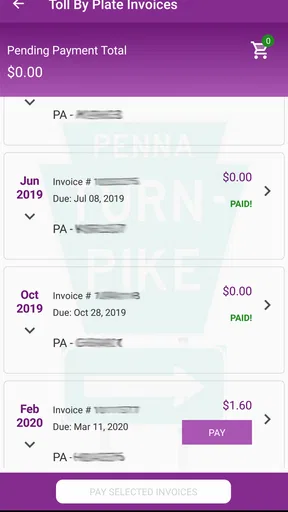
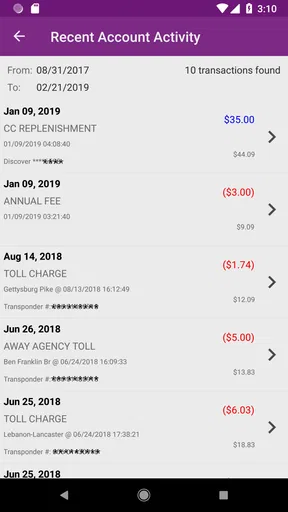
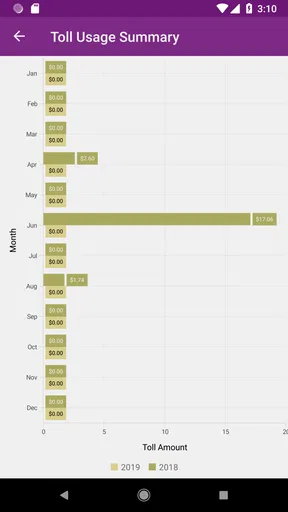
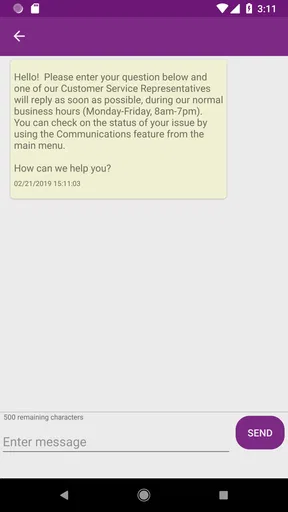
Our Review of PA Toll Pay
 Analysis by Appyee
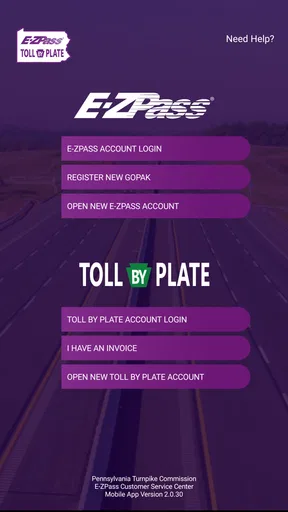
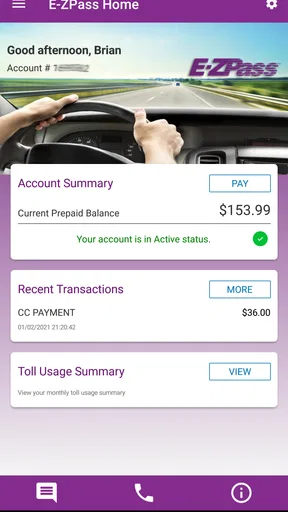
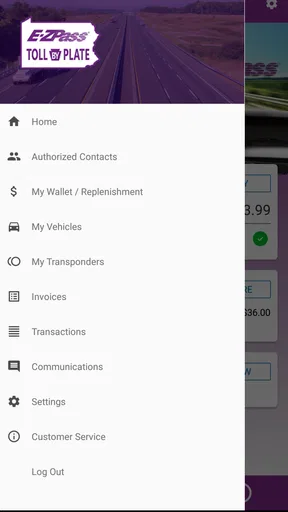
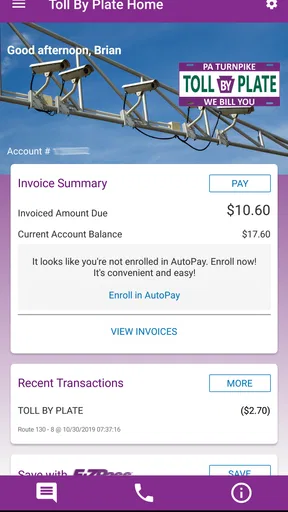
Driving on the Pennsylvania Turnpike is much easier when toll administration stays in the background, and PA Toll Pay is built for exactly that narrow but useful job. I see it as a practical account-management tool rather than a broad travel companion: it puts Pennsylvania Turnpike E-ZPass and Toll By Plate tasks on a phone, so I do not have to rely on a desktop browser every time I want to check or manage my account.
The app is free and belongs in the Travel & Local category. TransCore and the Pennsylvania Turnpike Commission are listed as its developers, and its Everyone age rating makes it suitable for a general audience. It has passed the half-million-install mark, which suggests that it has become a familiar option for drivers who regularly use Pennsylvania toll roads, although its average rating of 3.2 from roughly 1,300 ratings shows that the experience is not universally smooth.
How PA Toll Pay feels in everyday use
My first impression is that PA Toll Pay has a clear purpose. It is not trying to plan a route, find attractions, compare fuel prices, or replace a navigation app. Instead, it focuses on the account side of toll travel. That limited scope is a strength because I can open it with a specific question in mind: do I need to review my toll account, handle an E-ZPass matter, or manage a Toll By Plate account?
That focus also tells me who will get the most value. If I live in Pennsylvania, commute on the turnpike, or make regular trips that involve Pennsylvania toll facilities, having account access on the phone is convenient. I can deal with toll-related administration when it is fresh in my mind instead of waiting until I am back at a computer.
For an occasional visitor, the value is more conditional. Someone making one road trip may only need directions and a payment method, while a person who receives a Toll By Plate charge or manages an E-ZPass account has a more direct reason to install it. I would not download PA Toll Pay expecting a complete travel toolkit. I would install it because I need a Pennsylvania Turnpike account tool.
A realistic trip where the app earns its place
Imagine that I have just returned from a weekend drive and know that I used the turnpike several times. Instead of trying to remember every toll point or waiting for paperwork, I can open PA Toll Pay and review the relevant account information through the app. If I manage more than one vehicle or regularly switch between personal and work travel, having a mobile place to check the account is especially useful because the task can be handled during a quiet moment rather than becoming a separate administrative chore.
The important detail is timing. I would use the app before a long trip to make sure I can access my account, during a stop to check something that needs attention, and after the trip to keep toll activity from becoming a surprise. I would not use it while driving. The app is for parked, safe moments; it is an account utility, not a reason to interact with a screen on the road.
What the current release tells me
The current version is 2.2.81, and the app supports Android devices running version 5.0 or later. Those details matter because PA Toll Pay is not limited to only recent phones. Someone using an older compatible Android device may still be able to access it, which is helpful for a dedicated spare phone or an older handset kept in a vehicle.
The app was released on February 22, 2019, so it is not a brand-new experiment. Its continued presence and install base indicate an established service rather than a temporary companion app. At the same time, I would not interpret a current version number as proof that every part of the experience has been modernized. An update can preserve core account functions while leaving navigation, messaging, or sign-in friction largely unchanged.
That distinction is important when judging product evolution. The release history gives me confidence that the app remains maintained enough to have a current build, but it does not justify assuming that every requested improvement has arrived. I treat the latest version as a reason to try the app, not as a promise of a flawless redesign.
How the update affects existing users
For someone already using PA Toll Pay, the practical benefit of staying current is straightforward: the newest version is the best place to look for compatibility and service adjustments. I would update before an important trip rather than waiting until I am standing at a toll-related problem. That small habit reduces the chance of discovering an outdated installation when I need account access quickly.
Existing users should also keep their expectations realistic after an update. A newer build may improve stability or adjust how the app communicates with the underlying account service, but the main purpose remains the same. This is still a focused Pennsylvania Turnpike account app, not a new navigation platform. If I already like its basic workflow, an update should support that workflow; it should not be judged as though it were designed to do something entirely different.
One useful approach is to open the app after updating while I have time to recover from a problem. I would confirm that I can reach the appropriate account area, check that the information I normally use is available, and make sure I know how to contact official support if something looks wrong. I would not wait until the end of a trip to test it.
E-ZPass and Toll By Plate are different needs
PA Toll Pay is more useful when I understand which account type applies to me. E-ZPass users generally think in terms of an established toll account, while Toll By Plate users are dealing with tolls associated with a vehicle and plate rather than the same kind of transponder-based routine. The app brings both account contexts under one Pennsylvania Turnpike-focused experience, but that does not make the two systems identical.
This is one of the app’s less obvious trade-offs. A driver might open it expecting every toll issue to look the same, then feel confused when the available account information or next step depends on the payment method involved. I would first identify whether my concern is an E-ZPass account matter or a Toll By Plate matter, then use the app with that specific goal. That simple distinction makes the experience less frustrating.
I would also avoid treating the app as permission to ignore notices or account obligations. A mobile account view is convenient, but it does not replace careful attention to vehicle details, toll records, or any instructions connected with a charge. When money or a disputed trip is involved, I would compare what I see in the app with the official account information and keep relevant records until the issue is settled.
Where the app is stronger than the usual alternative
The usual alternative is opening a browser on a phone or computer and navigating to the Pennsylvania Turnpike’s account service. A browser can be perfectly adequate, especially for someone who uses toll services only once in a while. PA Toll Pay’s advantage is that it gives the account task a dedicated place on my phone. I do not have to remember which page to open or search for the correct service each time.
That dedicated identity also helps when I separate travel tools from account tools. I can use a navigation app for directions, a map for traffic, and PA Toll Pay for toll administration. In my view, this is better than expecting one general travel app to understand the details of a Pennsylvania Turnpike account.
The app is also a better fit than a paper-first approach for people who check information frequently. A commuter may want a quick account check after a regular journey, while a household managing several drivers may prefer having the relevant service available from a shared mobile device. The value is not that the app makes tolls disappear; it makes the administrative part easier to revisit.
Where a browser or another tool may be better
I would choose the browser instead if I needed a longer, more involved session and found the mobile layout restrictive. Account work can be easier on a larger screen, particularly when I need to read several details at once or carefully review a transaction. PA Toll Pay is convenient for access, but convenience and depth are not always the same thing.
I would also use a separate navigation app for route planning. PA Toll Pay should not be my only travel application because its purpose is account management, not turn-by-turn guidance or trip discovery. Keeping those roles separate is sensible, but it means I need more than one app for a complete road trip.
Finally, someone who rarely drives on the Pennsylvania Turnpike may find the app unnecessary. If I have no E-ZPass or Toll By Plate reason to check an account, installing another app adds little. The narrow audience is not a flaw by itself, but it is a reason to decide based on actual toll use rather than the general Travel & Local label.
Small workflows that make it more useful
My first practical tip is to use PA Toll Pay as part of a before-and-after-trip routine. Before leaving, I would confirm that I can access the right account. After returning, I would review the account when the journey is still easy to remember. This is more useful than opening the app randomly because it connects the account check to a real event.
My second tip is to keep E-ZPass and Toll By Plate questions mentally separate. If I see an issue, I would write down the vehicle, approximate journey, and account type before trying to resolve it. That preparation helps me avoid mixing a transponder-related question with a plate-based toll question, especially when more than one vehicle is involved.
My third tip is to treat the phone app as an access point, not the only record of an important dispute. For a routine check, the app may be all I need. For a charge I may need to challenge, I would save the relevant details in a separate note and follow the official process carefully. The best use of PA Toll Pay is quick, informed account management—not careless one-tap administration.
A fourth useful habit is to test access before a trip that depends on it. I would not assume that an app I have not opened for months will be ready at the exact moment I need it. Opening it in advance gives me time to deal with sign-in trouble, account confusion, or a needed update while I am still at home.
The friction I would want improved
The average rating of 3.2 suggests that a meaningful number of users encounter difficulties, even though the app has attracted more than 500,000 installs. I cannot turn those figures into a universal verdict: a toll account app may receive low ratings when users are already upset about a bill, a login problem, or a delayed account issue. Still, the rating is a useful warning that the experience may not feel effortless for everyone.
My main concern with a focused account app is that every weakness matters more. If navigation is unclear, there are not many other reasons to stay in the app and learn it. If a user cannot tell whether they are handling E-ZPass or Toll By Plate information, the narrow purpose becomes confusing rather than reassuring. A service like this benefits from plain labels, obvious account status, and a clear path from a question to the next action.
I would also be cautious about assuming that mobile access automatically means instant resolution. The app can be useful for viewing and managing an account, but account problems may still require careful review or an official support process. That is not unique to PA Toll Pay, yet it is worth remembering before downloading it with the expectation that every toll dispute will be settled immediately.
What I would watch in future releases
When I look at the current version, I would watch for improvements that reduce uncertainty rather than simply add more screens. Clearer separation between E-ZPass and Toll By Plate, better explanations around account activity, and a more reassuring recovery path when something goes wrong would have a direct effect on daily usefulness.
I would also pay attention to how well the app serves both regular drivers and occasional users. Commuters need speed and consistency, while visitors need guidance that does not assume they already understand Pennsylvania’s toll-account terminology. A good future release should help both groups without turning a simple account check into a complicated process.
Compatibility is another practical point. Because the app supports Android 5.0 and later, users with older devices may appreciate continued support. At the same time, newer phones should not feel as though they are receiving a dated experience. The strongest evolution would preserve broad accessibility while making the interface feel comfortable on current screens.
My recommendation for Pennsylvania drivers
I recommend PA Toll Pay to drivers who actively use the Pennsylvania Turnpike and want a dedicated mobile way to view or manage an E-ZPass or Toll By Plate account. It is free, focused, and more convenient than repeatedly searching for the right account page in a browser. For a commuter, a household with several vehicles, or anyone who wants to check toll activity soon after a journey, that convenience is meaningful.
I would skip it if I am looking for navigation, trip planning, or a complete road-travel assistant. I would also consider using the browser instead if I prefer larger-screen account work or only need occasional access. The app’s modest average rating means I would install it with sensible expectations and test it before relying on it during an important trip.
Overall, I see PA Toll Pay as a useful specialist rather than an essential app for every driver. Its value comes from reducing the distance between a toll question and the account screen where I can investigate it. The current release keeps that purpose relevant, while the remaining friction reminds me to use it deliberately: open it while parked, know which account type I am checking, and keep separate notes for anything serious. Used that way, it earns a place on the phone of anyone who regularly deals with Pennsylvania Turnpike tolls.
PA Toll Pay is best when you need practical Pennsylvania Turnpike account access, not when you want another general travel app.
Verdict
Strengths of PA Toll Pay
- Pay Pennsylvania tolls quickly without visiting a toll booth.
- Conveniently manage toll payments from a mobile device.
- Useful for drivers who occasionally travel on Pennsylvania toll roads.
- Digital payment records make transactions easier to track.
- Can help avoid delays associated with mailing toll payments.
Limitations of PA Toll Pay
- Primarily useful within Pennsylvania’s toll system.
- Requires accurate vehicle and license plate information.
- Payment issues may occur if account or card details are outdated.
- Not ideal for users who prefer cash or in-person payment options.
- A stable internet connection may be needed for some features.
Similar Picks in This Category
View All
Google Maps
Google LLC3.4

Google Maps Go
Google LLC4.1

Booking.com: Hotels & Travel
Booking.com Hotels & Vacation Rentals4.8

Google Earth
Google LLC3.8

Skyscanner Flights Hotels Cars
Skyscanner Ltd4.8

trivago: Compare hotel prices
trivago N.V.4.4
Frequently Asked Questions
What is PA Toll Pay and what can I use it for?
PA Toll Pay is the official mobile app for managing toll payments associated with Pennsylvania’s turnpike and toll facilities. After installing it, users can typically review account information, check toll activity, add or manage payment methods, and handle outstanding balances from a phone. It is especially useful for drivers who want a convenient alternative to visiting a website or customer-service center.
Do I need an E-ZPass account to use PA Toll Pay?
Not necessarily. PA Toll Pay may support different payment situations, including drivers with an existing Pennsylvania E-ZPass account and motorists who receive a toll invoice or need to pay a toll-related charge. The features available can depend on the account type and the specific toll notice. Before downloading, check whether your vehicle, invoice, or E-ZPass details are supported.
Can I pay a toll or invoice through the PA Toll Pay app?
The app is designed to help users manage eligible toll payments and account charges electronically. Depending on your situation, you may be able to enter information from a toll invoice, select a saved payment method, and confirm the transaction inside the app. Always review the vehicle, amount, due date, and confirmation details carefully before submitting a payment.
Is PA Toll Pay safe for entering payment and vehicle information?
PA Toll Pay is intended to provide an official channel for managing Pennsylvania toll-related information, which can be more reliable than using links from unsolicited text messages or emails. Nevertheless, users should download it only from the official Google Play Store or Apple App Store, verify the developer name, keep the app updated, and avoid sharing account credentials with anyone.
What should I do if the app does not recognize my toll notice or payment?
If PA Toll Pay cannot locate your invoice, vehicle, or recent payment, first confirm that every number was entered exactly as shown on the notice and check your internet connection. Make sure you are using the correct account or invoice details. If the problem continues, save any confirmation information and contact official Pennsylvania toll customer support rather than making duplicate payments.
